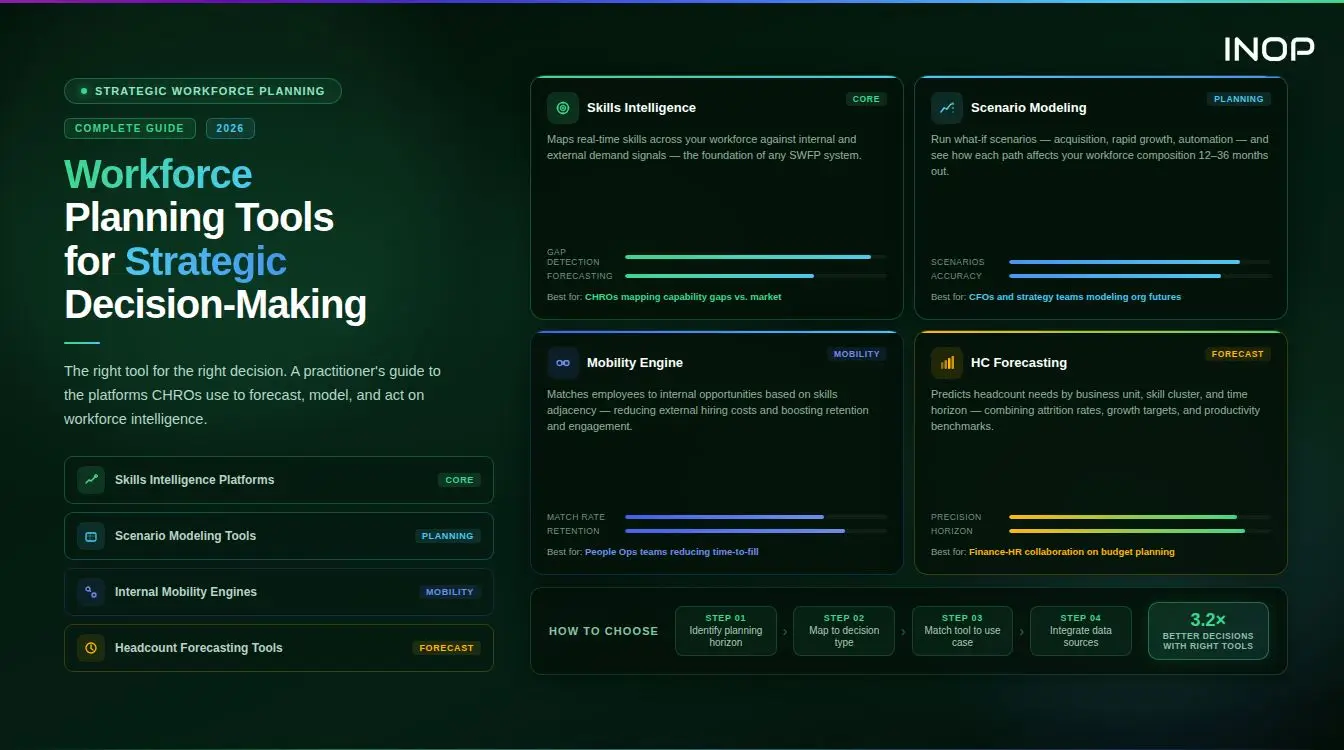
Workforce planning tools for strategic decision-making have become the infrastructure that separates organizations that anticipate talent challenges from those that discover them in financial results. When workforce risk surfaces in a revenue miss or a failed transformation programme, it is almost always a data visibility problem: the capability gap existed for months before anyone could see it clearly enough to act.
This guide covers how modern workforce planning platforms enable evidence-based decisions, what the top tools provide, how to evaluate them by role and use case, and how organizations are using workforce intelligence to make better calls on reallocation, redeployment, scenario planning, and build-versus-buy trade-offs.
Why Organizations Are Making Workforce Decisions Without Clear Data
The most common workforce planning problem is not a shortage of HR data. It is a shortage of decision-grade workforce intelligence. Most organizations have headcount data in their HRIS, performance data in their talent management system, skills data scattered across self-assessments and LMS completions, and financial data in their planning tools. None of these connect to each other in real time, and none of them translate directly into the answers strategic leaders need.
The result is a specific and costly failure pattern. Workforce risks surface in financial results before HR can act. A planned product launch stalls because the engineering capability required does not exist at the scale assumed. A market entry decision is made without understanding that the capability required to execute it would take 14 months to acquire externally. A restructuring removes capability that cannot be replaced for two years.
According to Gartner research, only 20% of HR leaders feel confident they have accurate data on employee skills. That gap is not a technology problem. It is a structural problem: workforce data has been designed for HR administration, not for strategic decisions. The tools that change this are built for a different purpose from the start.
What “Decision-Grade” Workforce Intelligence Actually Means
Not all workforce data is decision-grade. A spreadsheet of employee skills ratings is data. A platform that connects those ratings to business strategy, financial scenarios, and external market benchmarks is intelligence. The distinction matters because the strategic decisions that CHROs, CFOs, and Heads of Workforce Planning need to make require the latter, not the former.
Decision-grade workforce intelligence has four characteristics that distinguish it from standard HR reporting.
It is current. Skills data that was last updated 18 months ago during an annual performance cycle does not support a redeployment decision this quarter. Decision-grade intelligence updates continuously through multiple data sources: manager validations, project outcomes, certification completions, and AI-inferred capability signals from work activity.
It is connected. Workforce data that exists in isolation from financial planning, business strategy, and external market intelligence cannot support strategic decisions. The connection between “we have 40 people with cloud architecture skills” and “we need 60 to execute the digital transformation plan” requires linking workforce supply data to business demand data in a single view.
It is comparable. Knowing that your data science team averages a 3.2 proficiency score on machine learning is not decision-grade until you can compare it against what competitors are building, what the market is paying for that proficiency level, and what the gap costs to close through development versus external hiring.
It is auditable. As ESG disclosure requirements expand and investors increasingly scrutinize human capital risk, workforce intelligence used in strategic decisions must be traceable. The reasoning behind a headcount or reallocation decision should be documentable, not based on a VP’s intuition that nobody can reconstruct 12 months later.
The Top Workforce Planning Tools for Evidence-Based Decisions
The market for workforce planning tools splits into distinct categories based on what strategic question each is built to answer. Understanding these categories before evaluating specific platforms saves months of misdirected procurement process.
Category 1: Strategic Workforce Intelligence Platforms
These platforms connect skills data, financial planning, and business strategy into a unified intelligence layer. They answer the highest-level strategic questions: do we have the capability to execute this plan, where are the critical gaps, and what does closing them cost through each available route?
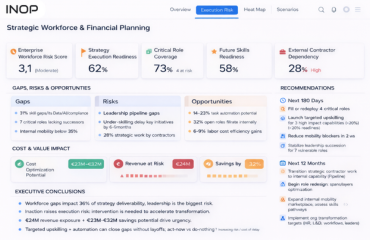
INOP is built specifically for this use case. Its Five Intelligence Lenses, covering Strategy, Finance, People, Market, and AI/Automation, give HR, Finance, and executive leadership a single view of workforce capability against business objectives. INOP connects skills gap data to financial scenario modeling, so a Head of Workforce Planning can show the CFO not just that a capability gap exists, but what it will cost to close through reskilling versus external hiring versus redeployment, and what the timeline looks like under each scenario. It is purpose-built for organizations that need audit-ready workforce intelligence, including PE portfolio companies preparing for exit readiness reviews. Book a 20-minute demo to see how INOP connects workforce data to strategic decisions.
Workday Adaptive Planning approaches workforce intelligence from the financial planning side, integrating headcount modeling with financial budgets. Strong for organizations where the CFO drives workforce planning cycles and the primary use case is financial scenario modeling rather than skills-level capability analysis. Less suited for organizations that need deep skills granularity or external market benchmarking at the competency level.
Visier is a people analytics platform with strong workforce forecasting and attrition prediction capabilities. It sits above the HRIS layer and connects data from multiple HR systems into planning insights. Particularly powerful for organizations with a dedicated People Analytics team who need to run sophisticated analyses on turnover, skills, and engagement data. Better suited to analytics-led teams than to operational HR leaders who need action-ready recommendations.
Anaplan is a connected planning platform used by FP&A teams for headcount and workforce cost modeling. Its strength is the financial modeling layer: organizations can build driver-based headcount forecasts that connect revenue growth assumptions directly to required staffing by function and level. The weakness relative to dedicated workforce intelligence platforms is the absence of skills-level analysis and internal mobility matching.
Category 2: Tools for Workforce Reallocation and Internal Mobility Decisions
These platforms operationalize the reallocation decision: given the skills that exist in the workforce, how do we move capability to where it is needed most, faster and more accurately than a manager network can?
Gloat combines a skills intelligence layer with an internal talent marketplace, enabling employees to be matched to projects, roles, and gig assignments based on verified skills rather than job title or manager recommendation. For organizations where internal reallocation is a primary strategic objective, Gloat surfaces the hidden capability supply that conventional staffing processes miss. Organizations using mature internal talent marketplaces report finding internal candidates for 40 to 60% of roles previously filled externally.
365Talents builds AI-powered skills graphs that map relationships between skills and connect employees to internal opportunities, learning recommendations, and succession pathways. Particularly strong for multilingual and geographically distributed workforces where capability is spread across entities and languages in ways that single-system views cannot capture.
Eightfold AI uses deep learning to build talent intelligence graphs from resumes, project histories, and skills assessments. Its skills adjacency modeling is one of the most sophisticated available: it identifies which employees are closest to a required capability even when they have not yet demonstrated it explicitly, enabling proactive development targeting rather than reactive gap filling.
Category 3: Skills Assessment and Gap Analysis Tools
These platforms provide the skills measurement layer that feeds decision-making tools. They answer the foundational question: what can our workforce actually do right now?
iMocha provides workforce-wide skills assessment with HRIS integration, enabling skills profiles to be verified through structured assessment rather than self-reporting alone. Its skills gap analysis at the organizational level, producing views by department, location, and role family, makes it particularly useful as the measurement input to a strategic planning process.
TalentGuard specializes in competency framework design and succession readiness assessment. For organizations building skills-based career pathways and succession benches, TalentGuard’s structured approach to competency definition and proficiency level anchoring provides the taxonomy foundation that other tools require.
For a complete guide to skills assessment tools across the workforce development use case, INOP’s guide on best skill assessment tools covers the category in depth.
Category 4: Capability Mapping Tools for Decision-Grade Insights
Several tools specialize in the mapping layer, connecting individual skills profiles to organizational capability views and external market benchmarks.
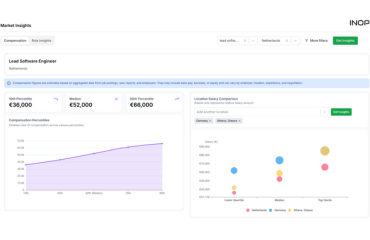
Lightcast (formerly Emsi Burning Glass) provides real-time labor market intelligence that answers external benchmarking questions: which skills are increasing in market demand, what are the salary premiums for specific capabilities, and how does the organization’s internal skills supply compare to the external market? This external layer is what turns an internal gap analysis into a build-versus-buy decision with financial grounding.
Microsoft Viva Skills infers skills from work activity in the Microsoft 365 ecosystem, providing a lightweight skills visibility layer for organizations already on Microsoft infrastructure. Best used as a signal source rather than a definitive skills record, since inference from work activity produces probabilistic rather than verified capability data.
How to Evaluate a Workforce Planning Platform: A Framework by Role
The right platform depends on who is making the decisions it needs to support. Here is how the evaluation criteria differ by role.
For CHROs and Chief People Officers
The CHRO’s platform evaluation question is: can this tool help me maintain credibility with the CEO, CFO, and board by connecting workforce strategy to measurable business outcomes? The specific capabilities that answer this question include scenario modeling that translates workforce investment decisions into financial projections the CFO recognizes, audit-ready reporting that satisfies ESG and human capital disclosure requirements without manual data assembly, and a clear line from skills gap data to the strategic priorities that appeared in the last board presentation.
Evaluation questions to ask vendors: Can you show me how a CHRO would present workforce risk to a board using this platform? How does the tool handle the connection between skills data and financial planning cycles? What does human capital disclosure reporting look like in your system?
For VP and Director of Workforce Planning
The workforce planning leader’s evaluation question is: can this platform give me confident scenario models rather than guesses? The specific capabilities required are driver-based demand forecasting that connects business growth assumptions to headcount requirements without manual recalculation, supply modeling that accounts for attrition, internal development velocity, and skills decay rather than just current headcount, and scenario comparison that shows the workforce and financial implications of three or four planning assumptions simultaneously.
Evaluation questions: How does the platform handle multi-scenario modeling? Can you show me how supply-side modeling incorporates attrition prediction and skills development trajectory? How does it update when business drivers change mid-cycle?
For People Analytics Leaders
The people analytics evaluation question is: can I trust this data enough to deliver reliable insights rather than spending my time on data reconciliation? The specific capabilities required are consistent data definitions that do not break when source systems are updated, integration depth with existing HRIS and talent management systems, and analysis flexibility that allows the analytics team to answer novel questions rather than being limited to pre-built reports.
Evaluation questions: How does your platform handle data conflicts when source systems disagree? What is the typical time from HRIS integration to first reliable insight? How does the system handle data governance when employee records change?
For VP of HR Operations and HRIT Leaders
The HR operations evaluation question is: can this system reduce manual data reconciliation while meeting audit and compliance requirements? The specific capabilities required are API-based integration with existing systems rather than CSV imports, audit-trail functionality that documents every data change with timestamp and source, and reporting that responds to ad-hoc executive requests without requiring the analytics team to rebuild models from scratch.
Evaluation questions: What is the integration architecture? How does your system handle compliance and data governance requirements? What does a typical ad-hoc executive data request look like in terms of response time?
For CFOs and FP&A Teams
The CFO’s evaluation question is: can this platform make workforce cost forecasting a live financial instrument rather than a quarterly reconciliation? The specific capabilities required are skills-adjusted compensation modeling that accounts for market premium drift in high-demand skills, scenario modeling that produces workforce cost projections that align with financial planning assumptions, and build-versus-buy analysis that presents the cost comparison between internal development, external hiring, and third-party augmentation in terms the finance team can audit.
Evaluation questions: How does the platform connect to our FP&A system? Can it produce workforce cost forecasts that use our financial planning assumptions rather than HR-side averages? What does the CFO dashboard look like?
Evaluating workforce planning platforms? See how INOP answers each of these questions in a 20-minute demo built around your specific role and use case.
What Data Is Essential to Guide Workforce Strategy Decisions?
The most common reason workforce planning platforms fail to support strategic decisions is not technology weakness. It is insufficient data quality going into the system. Before evaluating any platform, organizations need clarity on which data inputs are essential and which can be built progressively.
Non-Negotiable Data Inputs
Current headcount with complete organizational structure, including every employee’s function, level, location, manager, and contract type. This is the demand-side foundation and it must be current, not end-of-last-quarter.
Historical turnover rates segmented by role family, level, tenure bracket, and location. Blended organization-wide attrition rates are insufficient for supply modeling because they mask the variation that matters most: the fact that senior data engineers turn over at three times the rate of junior finance analysts.
Business driver projections from the strategic plan: revenue targets by segment, production volume plans, customer acquisition assumptions, or whatever operational metric most directly drives headcount requirements in your business model.
Skills profiles at least for the workforce segments most critical to your strategic plan. These do not need to cover every employee on day one, but the roles that are most critical to strategic execution need verified skills data, not title-based assumptions.
High-Value Data Inputs That Compound the Intelligence
External labor market benchmarking data that shows market rate and supply for the skills most critical to your plan. Without this, build-versus-buy decisions lack financial grounding.
Internal mobility history showing which employees have moved between functions, how long moves took, and what skills enabled them. This data trains the system on what internal reallocation actually looks like in your organization rather than in the abstract.
Learning and development completion data with skills outcomes, not just course completions. A training completion that does not result in a verified skills change has no value for workforce planning purposes.
Performance rating history at the individual level, not just team or department averages. Individual performance data connected to skills profiles is what enables readiness scoring for succession and redeployment decisions.
Five Strategic Decisions That Workforce Intelligence Changes
Decision 1: Build vs. Buy vs. Borrow for Critical Capabilities
This is the highest-stakes workforce planning decision most organizations make, and it is routinely made without adequate data. Should we develop the AI engineering capability internally over 18 months, hire externally at market premium rates now, or contract with a third party while internal capability is built?
Decision-grade workforce intelligence changes this from a debate into a financial analysis. The platform shows: how many employees have adjacent skills that could be developed toward the required capability and at what velocity based on their development history; what the external market rate for the required capability is currently and how it is trending; what the cost comparison looks like between the three routes over a 24-month planning horizon; and which route carries the lowest delivery risk given your project timeline.
Decision 2: Workforce Reallocation During Strategic Pivots
When strategic priorities shift, whether due to market changes, competitive pressure, or AI disruption, organizations need to move capability rapidly. The conventional approach, posting internal job descriptions and waiting for applications, takes three to six months and misses most of the eligible internal talent because people do not see themselves as candidates for roles with different titles from their current one.
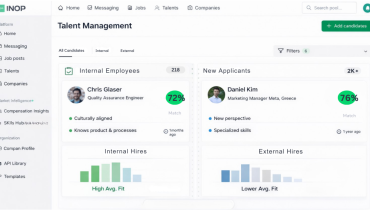
Workforce planning tools with skills-based matching surface internal candidates for redeployment based on capability proximity rather than title match. An employee who has spent three years in operations analytics and has developed statistical modeling and Python skills as adjacent capabilities may be the strongest internal candidate for a product analytics role that was about to be filled externally. Without skills visibility, that match never happens. For more on how organizations are connecting internal skills to redeployment decisions, INOP’s guide on workforce planning case studies covers documented outcomes across multiple industries.
Decision 3: Headcount Planning Under Uncertainty
Annual headcount planning built on a single set of assumptions breaks down in uncertain environments. Organizations that modeled 15% revenue growth in 2023 and built headcount plans accordingly learned the cost of single-scenario planning when the environment shifted. Workforce planning tools that support scenario modeling allow HR and Finance to plan under three or four simultaneous assumptions and to communicate the workforce implications of each to leadership in financial terms.
The specific capability required is driver-based modeling: the headcount plan updates automatically when the revenue assumption changes, rather than requiring HR to rebuild the model manually for each scenario Finance wants to test. For a complete treatment of how modern forecasting connects workforce scenarios to financial planning, INOP’s guide on modern workforce forecasting covers the methodology in depth.
Decision 4: Identifying AI Automation Risk Across the Workforce
As AI automation reshapes role requirements across every function, organizations need to understand which parts of their workforce are most exposed. This is not a question HR can answer from a job title list. It requires mapping specific task compositions of roles against automation probability models, then identifying which employees have adjacent skills that could support role evolution versus which face structural displacement risk with limited development pathways.
INOP’s AI/Automation intelligence lens provides exactly this analysis as part of its Five Intelligence Lens framework, enabling organizations to see workforce automation exposure as a quantified risk rather than a vague concern. This analysis feeds directly into reskilling investment prioritization: which capabilities are worth developing internally because the roles requiring them will grow, and which training investments would target roles with high automation probability where the return window is shrinking. For an assessment of which skills are gaining strategic value and which are at risk, INOP’s guide on emerging skills for 2030 provides the external benchmark.
Decision 5: Succession and Leadership Pipeline Readiness
Succession decisions made without skills data default to seniority and manager advocacy. The person who gets nominated for a critical leadership role is typically the most visible candidate, not necessarily the most capable one relative to the role’s requirements. Skills-based succession changes the question from “who do we know?” to “whose verified capability profile is closest to what this role requires, and what is the development distance to readiness?”
The financial implication is concrete. Organizations that make succession decisions based on verified readiness rather than seniority report significantly lower post-promotion failure rates. Each failed senior promotion carries a cost of 200% or more of annual salary in replacement expense, productivity loss, and team disruption, making succession decision quality one of the highest-ROI improvements that workforce intelligence enables.
Implementing Workforce Planning Tools: A Sequenced Approach
The most common implementation failure is purchasing a sophisticated platform before establishing the data quality and organizational habits that make it useful. The following sequence avoids this.
Phase 1: Data Foundation (Months 1 to 3)
Before deploying any platform, establish clean headcount data with complete organizational structure, conduct a skills taxonomy design for the three to five role families most critical to your strategic plan, and define your business drivers and how they connect to workforce demand. This phase feels slow but determines whether the platform you deploy produces decisions or produces data that nobody trusts.
Phase 2: Pilot Deployment (Months 3 to 6)
Deploy the platform against one business unit or function with the cleanest data and the highest strategic priority. Build the first scenario model for that unit: current capability supply, projected demand from the business plan, and gap analysis with cost modeling for each closure route. Present the output to a CFO or business leader. The credibility of that presentation determines organizational appetite for expansion.
Phase 3: Integration and Scale (Months 6 to 18)
Once the pilot has demonstrated decision value, integrate the platform with your HRIS, learning management system, and financial planning tools. Expand the skills taxonomy to cover additional role families. Build the supply-side model to include attrition prediction, development velocity, and external market benchmarking. At this stage, workforce intelligence becomes a continuous planning input rather than a periodic project.
Phase 4: Decision Integration (Months 12 to 24)
The final phase connects workforce intelligence to the actual decision-making processes that matter most: the annual strategic planning cycle, the quarterly business review, the headcount approval process, and the succession review cycle. When workforce data is a standard input to these processes rather than a separate HR report, it influences decisions rather than informing post-hoc reporting.
Measuring Whether Workforce Intelligence Is Changing Decisions
This is the measurement question that matters most and that most organizations neglect. The standard HR metrics, time-to-fill, cost-per-hire, engagement scores, do not reveal whether workforce intelligence is actually influencing strategic choices. The following metrics do.
Decision velocity for capability-dependent strategic initiatives. Track the time from “strategic initiative identified as requiring new capability” to “capability confirmed as available or gap plan established.” Organizations with mature workforce intelligence typically reduce this from three to six months to two to four weeks, because they do not need to conduct an ad-hoc assessment every time a new initiative is proposed.
Internal fill rate for strategic roles. What percentage of roles that are critical to strategic execution are filled by internal candidates identified through skills-based matching rather than external search? Each internal fill represents both direct cost savings and confirmation that the workforce intelligence is surfacing previously invisible internal talent.
Forecast accuracy for headcount and capability requirements. Compare workforce plans built with decision-grade intelligence against actual outcomes at 6 and 12 months. Organizations that use skills-based supply modeling and driver-based demand forecasting consistently report 20 to 35% improvement in headcount planning accuracy compared to historical-trend-based methods.
Cost of workforce decisions avoided. Document the specific decisions that workforce intelligence prevented: the external hire that was not made because an internal candidate was surfaced, the restructuring that was avoided because redeployment was confirmed feasible, the training investment that was redirected because the capability gap analysis showed a better route. These avoidance values are the clearest financial case for the platform investment.
Workforce Planning Tools for PE Portfolio Companies
For private equity operating partners, workforce planning tools serve a specific and time-constrained purpose that enterprise tools are not always designed for. The operating partner needs decision-grade workforce intelligence within 90 days of close, built on a portfolio company whose data governance may be inconsistent and whose leadership may not have engaged in structured workforce planning before.
The three questions that matter in a PE context are different from the questions that matter in a stable enterprise. First: does the workforce have the capability to execute the value creation plan, and where are the critical gaps that would prevent it? Second: where is capability concentrated in single individuals, creating key-person risk that threatens plan execution? Third: what is the cost comparison between closing critical gaps through internal development versus external hiring versus interim expertise, and which route is feasible within the timeline the value creation plan requires?
INOP’s strategic workforce planning platform is designed for this use case, providing rapid capability baseline assessment for portfolio companies connected to financial scenario modeling that operating partners and investment committees can use directly. For exit readiness, INOP’s audit-ready workforce reporting satisfies the human capital disclosure requirements that institutional buyers and their advisors increasingly require before close. Book a demo to see how INOP is used in PE portfolio workforce intelligence.
Ready to make workforce decisions based on real data instead of assumptions? See INOP’s workforce planning platform in a 20-minute demo.
Frequently Asked Questions
What tools assist in workforce reallocation decisions?
Workforce reallocation decisions require tools that can match employee skills to opportunity requirements faster and more accurately than manager networks. The leading platforms for this use case are Gloat, 365Talents, and Eightfold AI, which maintain dynamic skills profiles and surface internal candidates for redeployment based on capability proximity rather than title match. For organizations that need reallocation decisions connected to strategic financial planning, INOP’s workforce planning platform connects skills-based reallocation analysis to scenario modeling, so the cost and timeline implications of different redeployment options are visible alongside the capability matching data.
What data is essential to guide workforce strategy decisions?
The minimum viable data set for decision-grade workforce intelligence is: current headcount with complete organizational structure, historical turnover rates segmented by role family and level (not blended organization-wide averages), business driver projections from the strategic plan, verified skills profiles for roles critical to plan execution, and external market benchmarking data for the capabilities most central to your strategy. Organizations that begin with this foundation and build progressively from it consistently outperform those that attempt to build a comprehensive data infrastructure before making any decisions.
What reporting capabilities should a workforce planning solution provide to senior leaders?
Senior leaders need workforce reports that speak financial and strategic language, not HR metrics. The specific capabilities required are: workforce risk quantified in financial terms (what does a 15% attrition rate in engineering cost us in replacement expense and productivity loss?), scenario comparisons that show the workforce and cost implications of different planning assumptions simultaneously, skills gap analysis mapped to strategic initiatives rather than to generic role categories, and audit-ready documentation that supports human capital disclosure requirements without manual assembly. A dashboard that shows headcount, turnover, and engagement scores is an HR report. A platform that shows capability risk against strategic plan execution is decision support.
How do workforce planning tools handle skills gap analysis and identifying capability needs across teams?
Purpose-built workforce planning tools approach skills gap analysis at three levels simultaneously. At the individual level, they compare each employee’s verified skills profile against the requirements of their current role and any target role, producing a gap score and a recommended development pathway. At the team level, they aggregate individual profiles to show collective capability supply versus demand, identifying where a team has critical gaps that would prevent project delivery. At the organizational level, they map the total skills inventory against the strategic plan, producing a workforce-level view of which capabilities are sufficient, which are at risk, and which are absent. The key distinction from HR reporting tools is that the analysis is connected to business strategy, not just to job descriptions.
How can organizations make workforce decisions based on real data instead of assumptions?
The transition from assumption-based to data-based workforce decisions requires three structural changes. First, establish verified skills data that goes beyond self-reporting: manager validation, assessment results, certification records, and project outcome evidence all need to contribute to skills profiles rather than relying on annual self-assessment alone. Second, connect workforce data to business strategy and financial planning in a single system, so decisions about headcount, reallocation, and capability investment are made with visibility into their financial implications. Third, build decision review habits that require workforce intelligence as a standard input: any headcount request, redeployment decision, or succession nomination should be accompanied by skills data rather than making data an optional addition to decisions already made on intuition.
Which workforce planning platforms are best for cost-benefit comparisons of hiring versus outsourcing?
This is a specific capability that relatively few platforms handle well, because it requires connecting workforce analytics to financial modeling. INOP’s platform is designed specifically to support build-versus-buy-versus-borrow analysis, connecting skills gap data to market rate benchmarks and internal development cost models so that the financial comparison between hiring, contracting, and internal development is quantified rather than estimated. Anaplan and Workday Adaptive Planning handle the financial modeling layer but typically require manual input of the workforce capability data that INOP derives from skills intelligence. For organizations that need both the capability data and the financial modeling in a single system, purpose-built workforce intelligence platforms with financial scenario modeling integration are the most efficient solution.
How do you build an accurate picture of your organization’s current skills inventory?
Building a reliable skills inventory requires multi-source data collection rather than relying on any single method. Self-assessment provides employee perspective but systematically overestimates proficiency in areas of low knowledge. Manager assessment provides performance context but introduces proximity and favoritism bias. Technical assessment and certification records provide objective verification for skills that can be tested but miss behavioral and collaborative capabilities. The most reliable inventories combine all three: self-assessment as a starting point, manager validation against defined behavioral anchors, and objective verification through assessment or certification for high-stakes skills. Maintaining currency requires building update triggers into existing workflows: certification completions, project assignments, and performance review cycles should each automatically prompt a skills profile update rather than relying on a separate annual inventory process.
What should you look for when evaluating a people analytics platform versus building in-house?
The build-versus-buy decision for workforce analytics infrastructure turns on three factors: the time cost of building, the ongoing maintenance burden, and the depth of specialized capability required. Building in-house typically takes 18 to 36 months to reach decision-grade output, because the data pipeline, taxonomy design, validation methodology, and reporting layer all require specialized expertise that most HR and IT teams do not have in combination. The ongoing maintenance burden is also frequently underestimated: a skills taxonomy that does not update as role requirements evolve produces stale intelligence within 12 months. Purpose-built platforms provide immediate access to a validated methodology, pre-built integrations with common HR systems, and taxonomy management infrastructure. The build-in-house case is strongest only when the organization has unique data requirements that no commercial platform can accommodate, a data science team with specific workforce analytics expertise, and an extended timeline that allows for the build period without strategic decisions being made in the interim.
Book a Demo
Make confident workforce decisions that support strategy and value creation.